JAX 2022: "Flutter for Java Developers: Web, Mobile & Desktop Front-Ends from 1 Code Base?" (German Talk)

Summary
Yes, we can build frontends for mobile, web, and desktop from one codebase with Flutter. I wrote a sample app to demonstrate it. But I only recommend Flutter on mobile:
- Flutter on mobile gives us “2 apps for the price of 1”. Flutter code can use native libraries because it can call native code (and vice versa). It can also show both native screens and web views. So Flutter essentially can do everything native SDK apps do, but with a faster build & deploy experience. And we Java developers like Flutter because its language Dart is a “simplified Java, tuned for UI development”.
- Compared to frameworks like React/Angular/Vue, Flutter web only has the material design look & feel vs. hundreds or thousands of design system, component libraries, and UI skins. And because Flutter can’t use Javascript libraries, it just has a tiny number of libraries vs. hundreds of thousands of Javascript libraries for React/Angular/Vue.
- On the desktop, I think a web application is fine instead for most cases. If you still want a desktop application: Flutter is only stable on Windows (since February 2022), not on Mac and Linux. On the plus side, Flutter can call into desktop libraries with C++. But the third-party widget sets for Windows & macOS look & feel are incomplete. And will they be always be maintained going forward?
I can’t generally recommend the two Java front-end libraries, Jakarta Server Faces (JSF) and JavaFX:
- JSF can’t build the Single Page Applications (SPA) we get from frameworks like React, Angular & Vue. It’s very unpopular with developers and unpopular with employers and hasn’t received any new features in five years (Jakarta EE 10 will bring an update in mid-2022).
- JavaFX uses a UI build tool, not the more modern UI as code approach. On mobile, it can’t produce a native Look & Feel and doesn’t have access to all native features. It’s unpopular with both developers and employers.
Here’s my recommendation on which cross-platform framework to use on mobile, based on the knowledge of the developers.
- Web developers: Use React Native
- .NET developers: Use .NET MAUI
- Java developers that absolutely need to include one or more legacy Java libraries: Use JavaFX
- Else: Use Flutter
Please see my slides for why I came to this conclusion.
Information additional to the slides is below.
And here’s how to get started with Flutter:
Logistics
Conference
JAX Hybrid 2022 is a hybrid conference in Mainz, Germany. It ran from May 2 through May 6, 2022.
You can buy a ticket here:
Talk
My talk was on May 4, 2022, from 16:30-17:30.
Abstract
German
Nutzer greifen immer öfter mit Mobilgeräten auf unsere Java-Anwendungen zu. Und auf Mobilgeräten bieten native Anwendungen oft ein besseres Nutzererlebnis als Web-Anwendungen. Aber zwei unterschiedliche, native Anwendungen für iOS und Android zu entwickeln ist meist zu teuer und zeitaufwendig.
Cross-Platform Frameworks versprechen hier Abhilfe und ermöglichen Mobil-, Web- & Desktop-Front-Ends mit einer Code-Basis. Für Java-Entwickler ist Googles Flutter da die beste Variante. Aber kann Flutter dieses Versprechen wirklich halten?
Ich habe eine native Anwendung für iOS und Android mit Flutter entwickelt und in die App Stores gebracht. Aus meiner Projekt-Erfahrung heraus schildere ich Vorzüge von Flutter für Java-Entwickler, aber auch typische Probleme und deren Lösungen. Und mit einer Beispiel-Anwendung demonstriere ich, wie Mobil-, Web- & Desktop-Front-Ends mit einer Code-Basis tatsächlich gelingen können und welche Einschränkungen das mit sich bringt.
English
More and more users access our Java applications through mobile devices. And on mobile devices, native applications often offer a better user experience than web applications. But developing two different, native applications for iOS and Android is usually too expensive and time-consuming.
Cross-platform frameworks promise a remedy here and enable mobile, web & desktop front ends with a code base. For Java developers, Google’s Flutter is the best option. But can Flutter really keep this promise?
I developed native applications for iOS and Android with Flutter and brought them to the app stores. Based on my project experience, I describe the advantages of Flutter for Java developers, but also typical problems and their solutions. And with a sample application, I demonstrate how mobile, web, and desktop front ends can actually work with a code base and what restrictions this entails.
Who Made Me the Expert?!
I’ve been a Java developer for 23 years and still write code nearly every day. I’m a Java news reporter for InfoQ. So I know what’s going on in the Java world. In the QCon London 2022 & QCon Plus Spring 2022 program committees, I helped organize the Java and front-end tracks. So I know what’s going on in the industry.
I’m neither affiliated with the projects I’m discussing nor selling books or training courses. I share industry analysis and my project experiences to give you options for your next project. But in the end, you decide!
ADVERTISEMENT
Developer job ads down 32% year over year, Stack Overflow questions dropped 55% since ChatGPT. I now recommend IntelliJ Community Edition because many AI code assistants don't run in Eclipse. Job ads for Quarkus hit an all-time high.
See All Issues & Subscribe
Tell Me What to Change Next Time
If you’ve seen my talk, then please tell me what I can do better in my next talk.
Here’s what people said. Please note that you can view the second page with the arrow button at the bottom left.
Slides & Video
Here are the slides as PDF. They have more content and more text than my talking slides. They are 9.5 MB:
You can also get the slides in their original Keynote format. “Keynote” is Apple’s presentation application. Why would you do that? My slides have less text than the PDF version, so you can see what I cut. I also animated the slides, so they are more pleasant to watch. Or maybe you want to peek under the hood to see how I achieved specific effects. The slides also have fewer words than the PDF ones - it’s a talk, not a read! But they do have speaker notes. These slides are 12.3 MB.
Get Started With Flutter
Here’s my page for getting started with Flutter.
Additional Talk Information
How Cross-Platform Frontends
Web Framework Popularity
I said that React, Angular & Vue are the three most popular frameworks. I know because for my monthly Java report, I measure the popularity of JVM languages, databases, back-end frameworks, and front-end frameworks. I measure popularity among employers through job ads from 62 countries. For developer popularity, I use online training students, Stack Overflow questions, and Google searches. You can always view the current popularity of web front-ends here. Here are two of the four measurements from my upcoming May 2022 report.
Employers: Job Ads
The Indeed job search is active in 62 countries representing 89% of the worldwide GDP in 2020. It demonstrates the willingness of organizations to pay for a technology - the strongest indicator of popularity in my mind. Angular is the baseline. With 0.6% and 0.4%, respectively, Thymeleaf and Vaadin are missing from the chart.
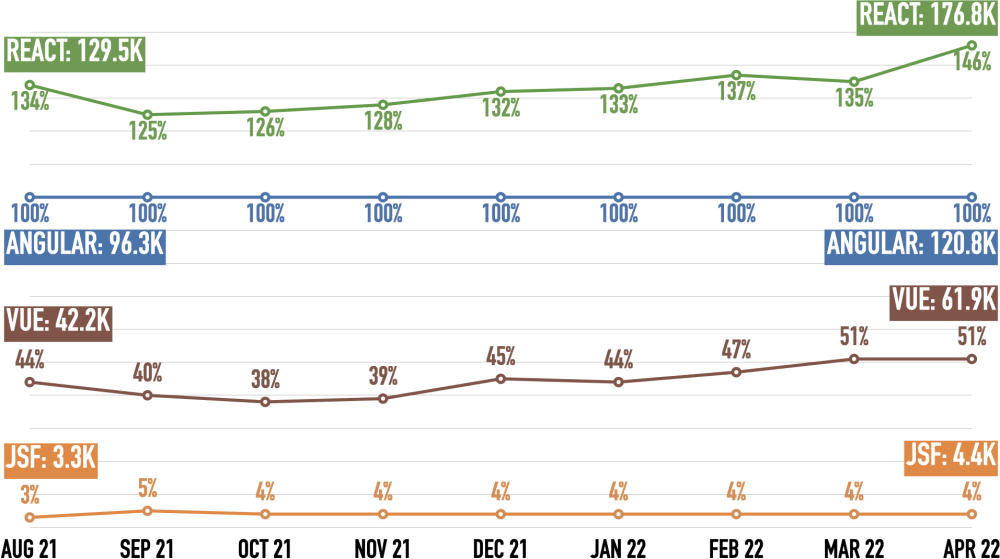
React wins, Angular is second, Vue third. React surged 11% last month, nearly leading Angular 1.5:1 now. Angular still lost 6% mentions over the last two months. Vue holds steady now at half of Angular’s volume. JSF is an order of magnitude behind Vue and has been steady for the last six months.
Please see here for details, caveats, and adjustments of the job ad mentions.
Developers
Google Searches
Google Trends demonstrates the initial interest in a technology over time. Thymeleaf is not on the list because Google only allows 5 search terms. “More searches = better” to me.
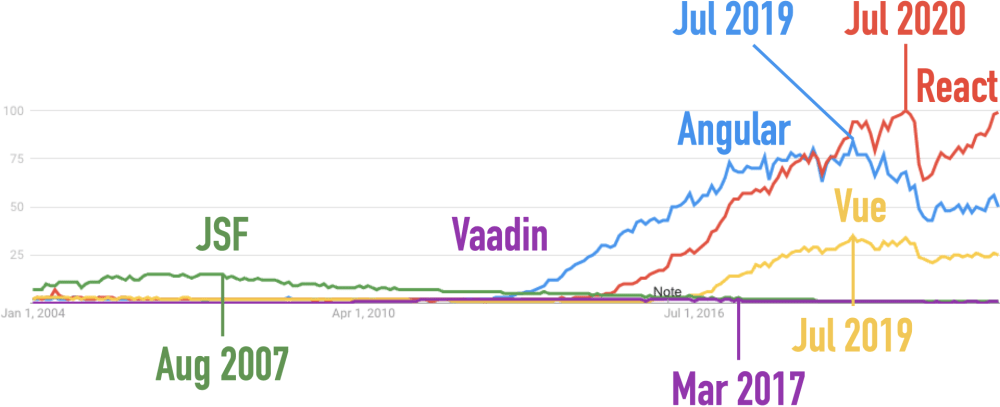
This link produces the chart above. Here’s a version with Thymeleaf instead of Vaadin: Thymeleaf also flat-lines.
React wins, Angular is second, Vue third. React is nearly back at its July 2020 peak and has twice the search volume of Angular. Angular has only two-thirds of its July 2019 peak. Vue peaked simultaneously but has remained flat at half of Angular’s volume for a year. All other frameworks are insignificant against these three.
Students at Udemy
Udemy is one of the biggest online learning sites. They publish the number of courses and the number of students (beyond a certain threshold). This shows how many people evaluate a technology. Angular is the baseline. The other frameworks don’t cross the reporting threshold for Students at Udemy (maybe around 100,000 students).
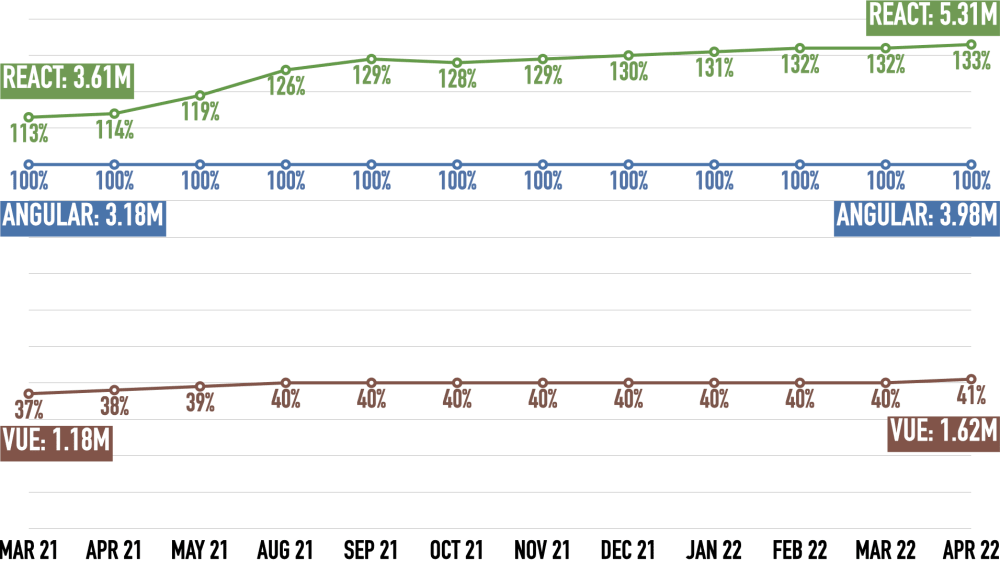
React wins, Angular is second, and Vue is third. React is slowly pulling away from Angular, while Vue catches up even slower.
Here are the links that show the courses for all and the number of students for some:
Questions at Stack Overflow
Stack Overflow Trends shows which percentage of questions at Stack Overflow has a particular technology tag. It is a proxy for using a technology during evaluation and productive use. “More questions = better” to me.
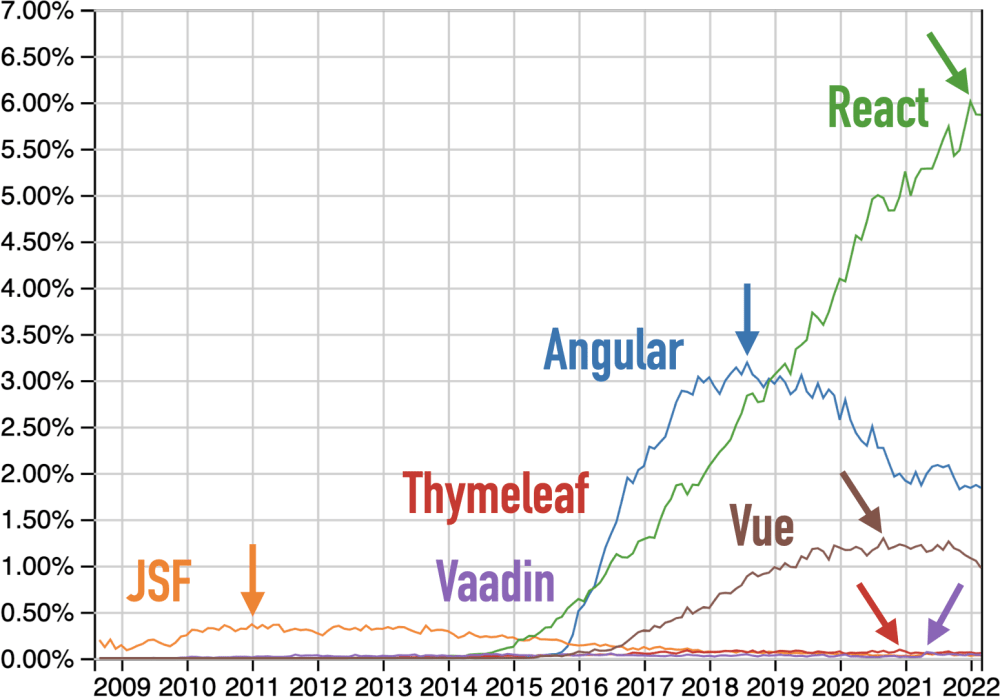
This link produces the chart above.
React wins, Angular is second, Vue third. React has grown spectacularly for seven years. After briefly exceeding 6% of all questions at Stack Overflow, it’s now taking a breather. Angular’s 3.5-year decline seems to have stopped. Vue has declined for half a year and is now back to early 2020 levels. JSF, Vaadin, and Thymeleaf barely measure against the “Big Three”.
Native Look & Feel?
The mentioned native look & feel and that it’s important. Especially on mobile where a vocal minority will complain if an iOS app looks like an Android one and vice versa.
Google’s own apps, like Google Maps or Google Mail, have used mostly Material Design UI elements on iOS for the last years. Not anymore: In order to “really make products feel great on Apple platforms”, Google is now switching to native iOS UI elements.
If you don’t use both iOS and Android regularly, you don’t know that they are meaningfully different. Even if you try to make them look and feel as similar as possible!
Here’s the “My Data” page from my app, both on iOS (left) and Android (right):
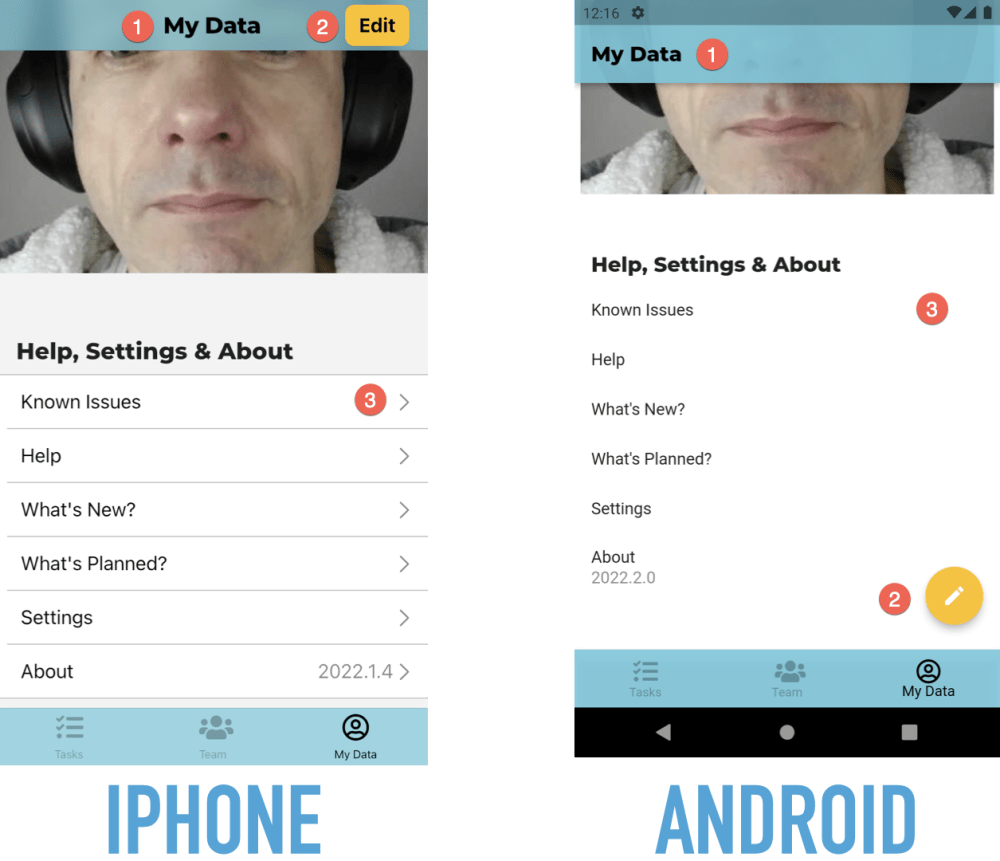
Here are three differences:
- The page heading is centered in iOS and left-aligned in Android.
- The “Edit” button is in the navigation bar on iOS and a floating action button on Android.
- When you can tap on a table row in iOS, it has a chevron on the very right. Android doesn’t have such an indicator.
Forms are also different:
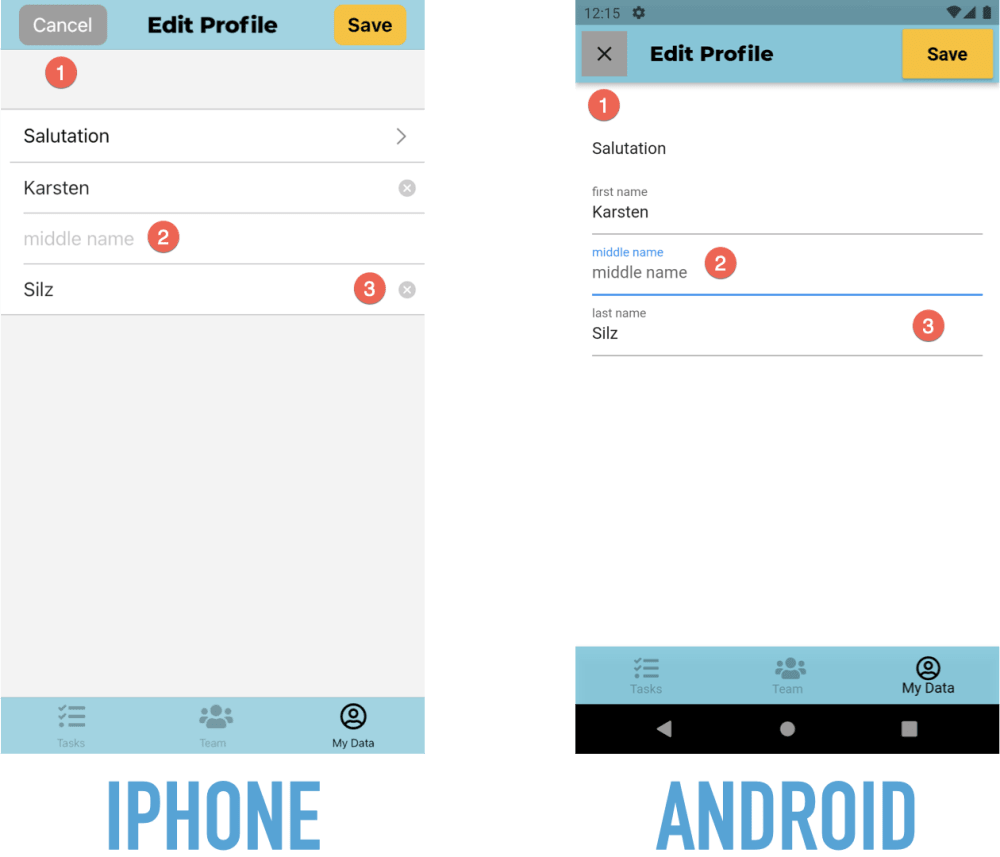
Here are some differences:
- The “Cancel” button has a text label on iOS and a symbol on Android.
- Fields have no label in iOS, just a placeholder when they are empty. They do both a permanently visible label and a placeholder in Android.
- Text fields in iOS have a “Clear” button. Android doesn’t have such a button.
Native Cross-Platform Frameworks
Building two separate, native apps for iOS and Android is very expensive. That’s why there are a ton of frameworks & tools to build one app and get two native mobile apps. My talk mentions Flutter, React Native, Xamarin/.NET MAUI, and JavaFX. Here’s are a couple more:
- Qt: This framework goes back to the 90s. Nokia owned it at one point. It stands out because you can build front-ends for embedded devices, too.
- Codename One: This Java-based framework for mobile, web & desktop. So it seems to be a direct JavaFX competitor. I had never heard of it before researching my talk. They claim “Trusted by 40k+ developers”.
- Volt MX: This is a low-code framework for building both the front-end and back-end of an application. It has a visual designer and component libraries. JAX had a German talk about it.
How Flutter Works
Declarative Model
I have a guide to getting started with declarative development:
Widgets
Flutter doesn’t use native UI elements (such as text fields or buttons). Instead, it emulates them. See here for more details.
Widget Sets
I built a sample Flutter application with five different, native “Look & Feels” with one codebase: Web, iOS, Android, Windows, and Mac. I showed screenshots during the talk. You can read more about this application below. You can run it yourself if you have Flutter installed!
My Flutter Experiences
My Project
The start-up I co-founded is called “Your Home in Good Hands”. We’re currently in private beta. Our service will be publicly available later in 2022.
Flutter: Mobile 👍🏻
I have a page dedicated to getting started with Flutter. Please check it out!
Flutter Hot Reload makes code changes go live in the device/simulator immediately. It’s the main reason why working with Flutter can be such fun! Here is a video demonstrating it.
I’m not ready to fully share our app. We do have screenshots on our home page, but they are slightly out-of-date.
But I did build a prototype in 2019 wHich at least shows a Flutter app in motion. Although it’s old, this is still a decent example of what a native Flutter app can look like. It took me about six weeks and was my first Flutter project. I used Google’s cloud service Firebase for login, No-SQL database, and file storage. I also built my own back-end with Java, JHipster, Spring Boot, and Angular.
Firebase 👍🏻
I also have a page dedicated to getting started with Firebase. Please check it out!
Mobile Power
Mobile phones are very powerful. They got powerful CPUs and lots of local storage. So when developing for mobile, we should think of phones more like PC, less like web browsers.
One way to harness that power is to load and save data in the background.
- My app loads a lot of data in the background. So when the user hits many screens, there’s no wait like there often is on web pages - the data’s already there! But then my app immediately refreshes the data to make sure the user sees the latest data. This also helps when the phone’s offline: The data’s already there.
- For many operations, my app also saves in the background. So the app stores the data locally and returns control to the user. It then sends the data to my back-end in the background. Again, this helps when the phone’s offline: The data remains on the phone until the user is online again. Now saving in the background only works when we don’t expect errors from the back-end (like form validation errors): We can’t show errors easily because the user already moved on to other screens. And saving in the background may make our apps more complicated because we may have to “manually merge” our locally stored data into the data we loaded from the server.
Now storing data locally and loading & saving data in the background is easy with Flutter. But we can also do that in a web application. It’s more difficult and more restricted, but it’s doable.
I know because at the end of 2019, I built such a web application. That was a so-called progressive web app (PWA). A PWA uses the “Service Worker” in a browser to install on your device and cache data. It took about four weeks, and it was my first PWA. I used Google Workbox for this but developed my own offline storage solution in the browser. I built my back-end with Java, JHipster, Spring Boot, and Angular.
One Source Of UI Truth
This is how I make sure my app UI doesn’t get “out of sync”. Let me show you two examples of UIs that are “out of sync”.
This is the iPad app of the UK price comparison site Pricespy. That app isn’t sure whether my list has seven items (top left) or just three (right):

And here’s the macOS App Store. I just added $75 to my account which is now $113.38 (see the top right). But in the bottom left, it still says $38.38!
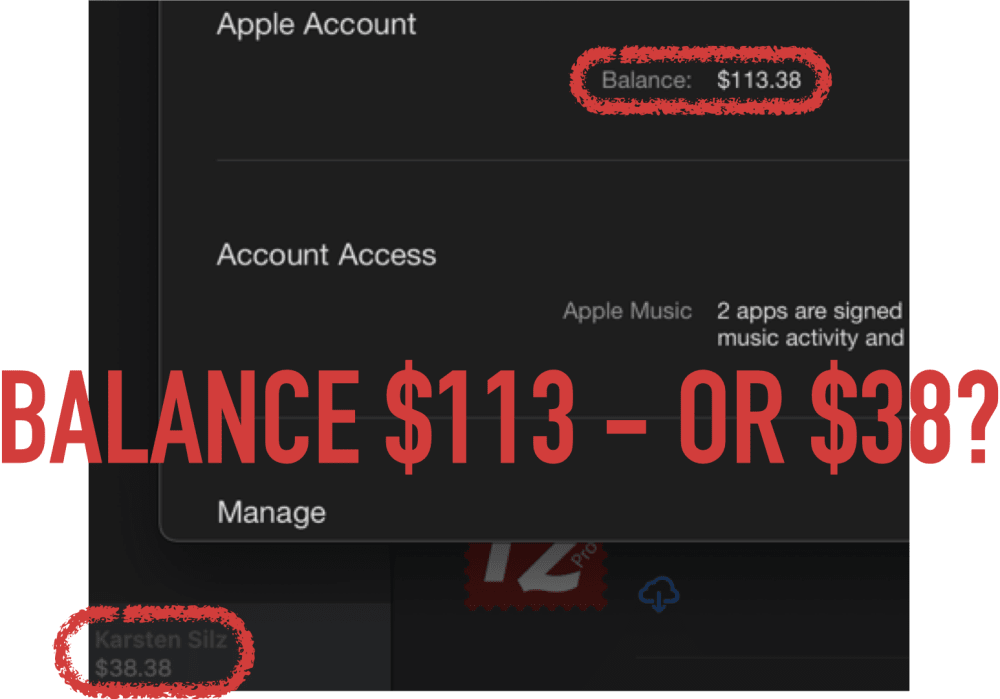
So I just gave money to the most valuable company in the world. And they can’t figure out how much is in my account… This is embarrassing if you ask me! It took a couple of hours until the App Store was back in sync.
So, how to fix this? There are many different ways. I went with a global data store. My Start with Flutter page explains the use of Redux as a data store.
But that wasn’t enough. We also have to remove duplicates from our locally stored data. Here’s an example from my app:
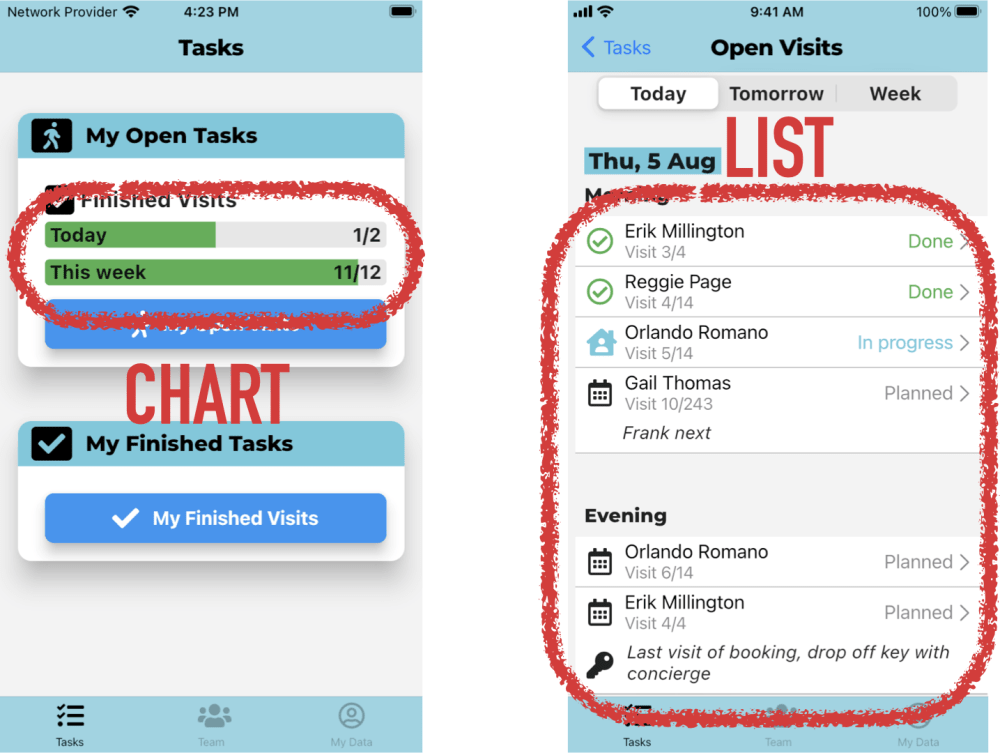
The task home page (left) shows a chart with statistics about how many visits are already completed. The visit list (right side) shows a list of those visits. Initially, I stored this as two different data structures in my app: visit statistics and a list of visits. Now they could get out of sync, too: A user just finished a visit which triggered a refresh of the visit list. But the app didn’t refresh the visit statistics, so the task home page would show an incorrect, out-of-date chart.
So my solution was to get rid of storing the visit statistics altogether. Now the app calculates visit statistics for the chart on the left in real-time, iterating over all the visits and checking their status. And yes, my app can do that because phones are powerful - see the previous section.
Be Consistent
My start-up offers a web app for managers and a mobile app for cat-sitters. So arguably, consistency between them is nice-to-have.
Now most managers are also cat-sitters. So they use both apps. This makes consistency a necessity!
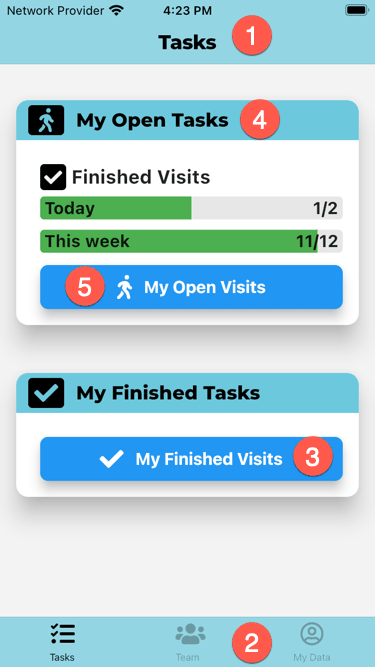
So let’s look at the two apps. Here is the mobile app for cat-sitters:
And here is the web app for managers:
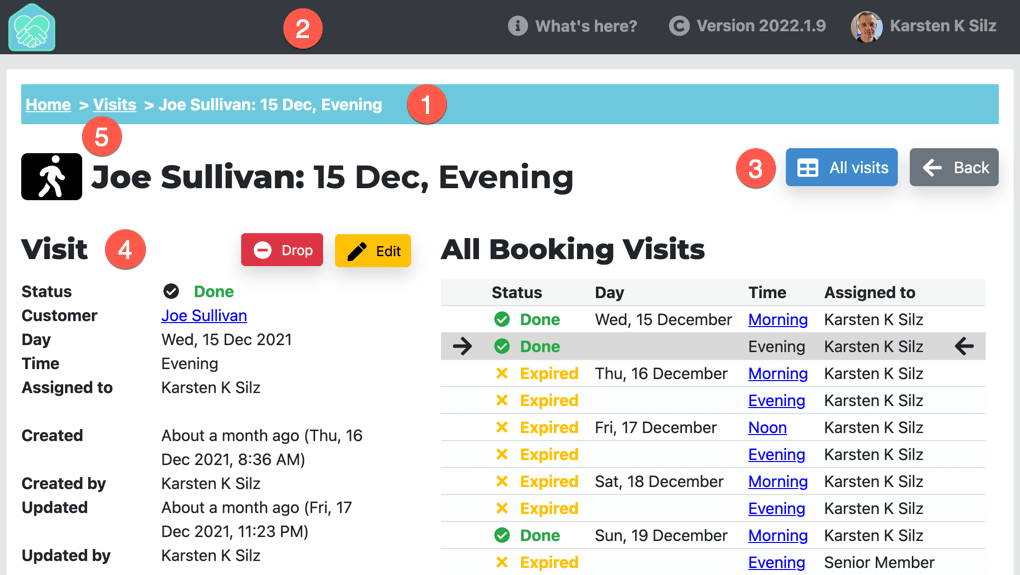
So how is this consistent - or how is different?
- Both apps use different navigation paradigms. The mobile app has a nav bar at the top (1) and a tab bar at the bottom (2). The web app has breadcrumbs (1) and a header (2).
- Both apps share the same colors. For instance, the mobile nav bar (1) & tab bar (2) and the web app breadcrumbs (1) all use the primary brand color. Navigation also uses the same kind of blue (3).
- The apps also use the same Google font for headings (4): Montserrat.
- Finally, the apps share symbols from Font Awesome: A walking person in this example (5).
Here are some good design books:
- The Design of Everyday Things by Donald A. Norman
- Don’t Make Me Think by Steve Krug
- The Mom Test by Rob Fitzpatrick
Back To Basics
Writing mobile apps is still writing software. So the same best practices apply here, too:
- The best code is the one you don’t have to write. So reuse code somebody else wrote! In Flutter, this means using a plugin.
- DRY: Don’t repeat yourself. So instead of applying the same configuration code widgets over and over, we should create our own widgets.
- We should also structure our applications with best practices. That means horizontal layers and can mean vertical layers.
The Start with Flutter page has an architecture section that explains my proposed use of components & layers.