
Conference
JavaLand 2021 is a two-day online conference. It runs from March 16 through March 18, 2021 (the third day is a training day).
It’s Germany’s biggest Java conference and had 2.100 visitors in 2019. The German Oracle User Group, the Association of the German Java User Groups, and the German publisher Heise Medien organize this conference. Due to COVID-19, the conference in March 2020 was canceled.
Talk
My talk was an online talk in German. Its title translates into “How should Java Developers build Front-Ends for Web, Mobile & Desktop today?”. I presented on Tuesday, March 16, 2021, from 16:00 to 16:45 CET.
Unfortunately, the conference had lots of technical issues on the first day. I was the second-last talk of the day. Given the eight parallel tracks and the 1.300 participants, I expected an audience of at least 30 people. Before I started my presentation, I did see maybe 3 or 4. I’m not sure if that was accurate. And then the moderator couldn’t participate in the chat where I was to get questions. So off I was to Gather.Town after my talk!
What’s Gather.Town? Glad you asked! It’s an online meeting tool that looks like a Super Nintendo game from 30 years ago. Here’s me, waiting in front of theater (“Schauspielhaus” in German) for people with questions:
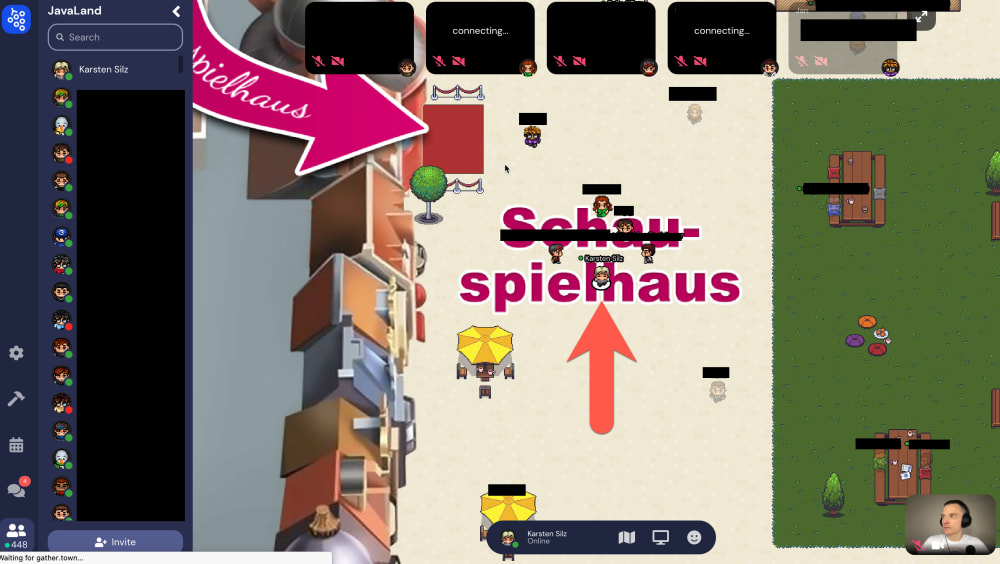
I did have a video chat with one listener and a text chat with another one. Nice!
Abstract
German
Smartphones sind die populärste Art, auf Anwendungen zuzugreifen. iOS und Android stellen dafür ausgereifte Plattformen zur nativen App-Entwicklung bereit. Es ist aber teuer und aufwändig, zwei separate Apps für iOS und Android zu entwickeln. Web-Anwendungen laufen zwar auf beiden Plattformen. Leider hinken sie aber gerade auf iOS hinter den Fähigkeiten nativer Apps hinterher und bieten eine eher ärmliche “Developer Experience”.
Deswegen werden Plattformen wichtiger, die aus einer Code-Basis native Apps für iOS und Android erzeugen. Facebooks React Native und Googles Flutter führen dieses Feld an. Beide nutzen, genau wie Apples Swift UI und Googles Jetpack Compose, deklarative Programmierung und bieten eine exzellente “Developer Experience”. Flutter ist jedoch als “UI Toolkit für jeden Ort, wo Pixel gemalt”, ehrgeiziger: Web-Anwendungen mit Flutter sind im Beta-Stadium, Desktop-Anwendungen im Alpha-Stadium (Stand September 2020). Flutter ist darüberhinaus für Java-Entwickler interessanter, weil die verwendete Programmiersprache Dart als “Zwei Teile Java, ein Teil JavaScript” beschrieben werden kann.
Der Autor hat im Sommer 2019 einen Flutter-Prototyp entwickelt und im Winter 2019/2020 eine PWA. Danach entschied er sich, für eine Software as a Service (SASS) die nativen iOS- und Android-Apps mit Flutter umzusetzen. Das Back-End war eine Spring-Boot-Anwendung, das Web-Front-End lief mit Angular. Im Vortrag demonstriert der Autor die iOS- und Android-Apps und berichtet über seine Erfahrungen mit Flutter. Anhand von Code- und Werkzeug-Beispielen zeigt er Vorteile auf und geht auf typische Probleme und deren Lösung ein.
English
Smartphones are the most popular way to access applications. iOS and Android provide mature platforms for native app development. However, it is expensive and time-consuming to develop two separate apps for iOS and Android. Web applications run on both platforms. Unfortunately, they lag behind the capabilities of native apps on iOS and offer a rather poor “developer experience”.
That is why platforms that generate native apps for iOS and Android from one code base are becoming more important. Facebook’s React Native and Google’s Flutter lead this field. Just like Apple’s Swift UI and Google’s Jetpack Compose, both use declarative programming and offer an excellent “developer experience”. However, Flutter is more ambitious as a “UI toolkit for every place where pixels are painted”: Web applications with Flutter are in beta, desktop applications are in alpha (as of September 2020). Flutter is also more attractive to Java developers because the Dart programming language can be described as “Two parts Java, one part JavaScript”.
The author developed a Flutter prototype in the summer of 2019 and a PWA in winter 2019/2020. Then he decided to implement the native iOS and Android apps with Flutter for Software as a Service (SASS). The back end was a Spring Boot application, and the web front end ran with Angular. The author demonstrates the iOS and Android apps and reports on his experiences with Flutter in the lecture. Using code and tool examples, he shows advantages and goes into typical problems and their solutions.
Why Should You Listen To Me?
I’ve been a Java developer for 22 years. As a full-stack developer, I’m about to put my third project into production since 2017. I was the sole developer on two of them and the lead developer on the third one.
I’m neither affiliated with the projects I’m discussing nor selling books or training courses. I share industry analysis and my project experiences to give you options for your next project. I use 12 criteria for my evaluation. You may use my criteria or pick your own or weigh my criteria differently than I do. But you need to apply your criteria in your own environment and make your own choices.
Audience Rating & Feedback
This is the feedback I got on my talk. Please note that you can view the second page with the arrow button in the bottom left.
Slides
Here are the slides as PDF. They are 3 MB:
You can also get the slides in their original Keynote format. “Keynote” is Apple’s presentation application. Why would you do that? My slides have less text than the PDF version, so you can see what I cut. I also animated the slides, so they are more pleasant to watch. Or maybe you want to peek under the hood to see how I achieved specific effects. These slides are 8 MB in size.
Videos
Talk
The link to the video will be available here after the talk. It may be behind a paywall.
Flutter Hot Reload
Flutter Hot Reload makes code changes go live in the device/simulator immediately. It’s the main reason why working with Flutter can be such fun! I mentioned it in the talk. Here is a video demonstrating it.
Mobile App Prototype with Flutter
Although it’s a bit old, this is still a good example of what a native Flutter app can look like.
In the summer of 2019, I built native iOS/Android apps with Flutter to validate a business problem. It took me about six weeks, and it was my first Flutter project. I used Google’s cloud service Firebase for login, No-SQL database, and file storage. I also built my own back-end with Java, JHipster, Spring Boot, and Angular.
Progressive Web Application Prototype
At the end of 2019, I built a progressive web app (PWA) to speed up app development. A PWA uses the “Service Worker” in a browser to install on your device and cache data. That was about four weeks, and it was my first PWA. I used Google Workbox for this but developed my own offline storage solution in the browser. I built my back-end with Java, JHipster, Spring Boot, and Angular.
Developer job ads down 32% year over year, Stack Overflow questions dropped 55% since ChatGPT. I now recommend IntelliJ Community Edition because many AI code assistants don't run in Eclipse. Job ads for Quarkus hit an all-time high.
See All Issues & Subscribe
Looking For Project in October 2022!
And now for some shameless self-promotion: I’m looking to join a project in October 2022, in Milton Keynes, London, or remote. I’ll work as a contractor or fixed-term employee but don’t take permanent positions. Interested? Then check out my resume & work samples!
Additional Talk Information
How Can We Build Front-Ends Today?
Declarative Front-Ends
Apple’s SwiftUI
SwiftUI is Apple’s take on declarative front-ends. Here’s the counter example from the talk, with slightly changed formatting:
|
|
Google’s Flutter
Flutter is Google’s cross-platform implementation of declarative front-ends. It reached the stable version 1.0 for mobile in December 2018. Here’s what the SwiftUI counter sample looks like in Flutter:
|
|
Google’s Jetpack Compose
Jetpack Compose is Google’s Android implementation of declarative front-ends. So Google has two different horses in this race: Jetpack Compose and Flutter. Of course, it’s Google! 😒
Jetpack Compose entered beta on February 24, 20201. According to Google, it now has stable APIs and is feature-complete.
I adopted the counter sample in this tutorial to look like the SwiftUI sample above:
|
|
Microsoft’s .NET Multi-platform App UI (MAUI)
.NET MAUI is part of .NET 6, expected for November 2021. And if “Maui” rings a bell for you - it’s the second-largest island of Hawaii.
Microsoft calls its implementation of declarative front-ends “Model-View-Update” (MVU). Here’s what I think the SwiftUI sample from above will look like in MVU. I adapted the sample from the announcement post:
|
|
Facebook’s React
And finally, here’s what the counter looks like in Facebook’s React for web applications. I adapted it from this Stackblitz sample. You see some HTML code in there because I don’t use components to keep things simple. If I did, it would look as declarative as the other examples:
|
|
Web Applications
Popularity
- I recorded the Google Trends and Stack Overflow Trends data on Thursday, March 11, 2021.
- I recorded the Stack Overflow Jobs, Monster, and Udemy data on Friday, March 12, 2021.
- The Google search numbers are too low for Vue.js because many people search for “vue” instead. But “vue” has other meanings in English, so I didn’t use “vue” results. Only the “vue.js” ones are counted here.
Ranking
I ranked React fastest for two reasons:
- React has an experimental feature called Concurrent Mode. If it makes it into production, it will improve data loading with multiple components on a page.
- ReactDOMServer lets us send HTML from the server to the browser before the React application is ready. The other frameworks may have something similar.
Native iOS & Android Apps
Popularity
- I recorded the Google Trends and Stack Overflow Trends data on Thursday, March 11, 2021.
- I recorded the Stack Overflow Jobs, Monster and Udemy data on Friday, March 12, 2021.
- Flutter is at a disadvantage on Monster. Often, you find the following in job ads there: “experience with a cross-platform framework like Xamarin or React Native required”. Now Flutter is a cross-platform framework. But if you just have “Flutter” in your resume, you still may not get the job.
- First of all, most big companies today use Applicant Tracking Systems (ATS). These systems scan your resume automatically for keywords. So if “Flutter” isn’t an approved keyword, you’re out.
- The next stage is the agency or HR department. They typically have no clue about programming. How could they? They hire people in all sorts of professions. So if they don’t know about “Flutter”, you’re out again. It’s not all sunshine and roses, you know!
- Hopefully, the developers at the end know Flutter.
- I didn’t include Flutter course numbers from Udemy. Usually, when you search for a popular topic, Udemy offers a special “Explore X courses” link. You see that below for Angular:
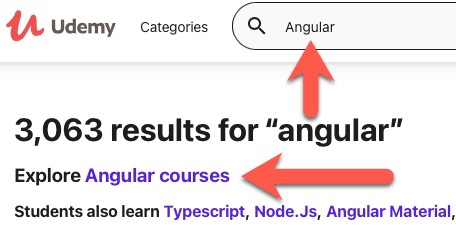
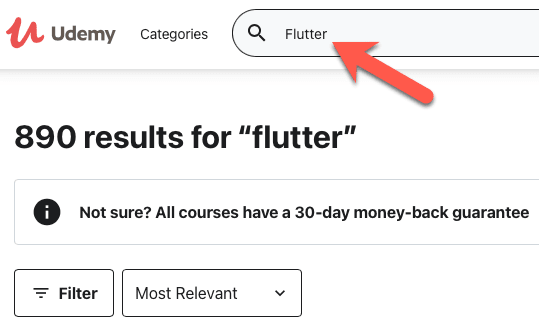
- But Udemy doesn’t do this for Flutter. That’s why there are no Flutter numbers here.
React Native Vs. Flutter
- React Native always uses a JavaScript VM to run our applications. Flutter uses a Dart VM during development and compiled native code when deployed. That’s faster.
- React Native manages the native iOS/Android UI elements through a JavaScript bridge. That’s slower than Dart: Dart uses the Google open-source Skia Graphics library. Chrome and Firefox, Chrome OS, and Android also use Skia. But this also means Flutter only paints pixels: It has to recreate all native iOS/Android UI elements in Flutter.
Will Google Kill Flutter?
- In 2019, Flutter was the project with the third-highest number of contributors at GitHub (section “Top and trending projects”). It had 13k. Azure Docs had 14k, VSCode had 19k. I couldn’t find these numbers for 2020.
- Toyota picked Flutter to power future car entertainment systems. I’m not sure if this is just a test by Toyota or if they already decided to go ahead with Flutter for production.
Responsive Design
Flutter gives us little help on responsive design: Find out the screen width and change your UI. Wonderful! So no grid, like in Bootstrap or the more powerful, but also more complicated HTML version. Anyway, I went with flutter_bootstrap for now.
Does Flutter Do Too much?
- Animations on iOS can stutter when first used. There’s now a project for that in Flutter.
- Flutter has more than 8,500 open issues. But the team claims that they close at least as many as are being opened. Seems true for February 16, 2021 – March 16, 2021: 1,210 closed, 695 opened.
- “Sound Null Safety” is a feature of Dart that’s new in Flutter 2.0. It does away with
NullPointerExceptions. But we need to update our code. And the plugins we use also need to be null-safe. And so do their dependencies… It’s clear to me that this will take a while and that some plugins will not be updated and fall by the wayside. Now Flutter has a migration tool for null safety that’s stunning: It’s a web server that can automatically update your code! Watch it here:`
- Flutter hired a development studio to maintain the Firebase plugins, but I can’t find a link right now. Firebase is a lot of Google services for applications.
Notable Flutter Plugins
- flutter_bootstrap: Make your app responsive with the Bootstrap grid.
- flutter_platform_widgets: Provides UI element abstractions that automatically create either an iOS or Android UI element, depending on the current mobile operating system.
- google_fonts: Adds Google Fonts to your Flutter application.
- url_launcher: Launch apps to open links, send emails, start phone calls or text messages. You could probably also launch application-specific URLs.
- flutter_email_sender: Send email in-app, using standard iOS/Android components.
- google_maps_flutter: Open Google Maps inside your app. Using Google Maps in your app is free on iOS and Android.
- connectivity: Find out when the network connectivity of your app changes.
- image_picker: Access photos & videos on iOS and Android.
- camera: Access the camera on iOS and Android.
- image_cropper: Edit pictures.
- photo_view: Show pictures with pinch-to-zoom.
- flutter_markdown: Show Markdown.
- native_pdf_view: Show PDF documents.
- flutter_html: Show HTML.
- freezed: Generate immutable classes, complete with JSON serialization.
- flutter_easyloading: Toast overlays for progress & success/info messages.
- package_info: Get the application version number for your “About” screen.
- device_info: Get device information for your “About” screen.
Getting Started
React & JavaScript
The React website is a good starting point. React uses JavaScript to create web applications.
Learning JavaScript
- The MDN Web Docs (the site formerly known as “Mozilla Developer Network”) has various tutorials based on your skill level.
- academind has a JavaScript course with 40 hours of video. The same course is on Udemy, where it may be cheaper in frequent sales.
Learning TypeScript
TypeScript mixes “some Java into JavaScript”, such as types. Hence the name! You have to use TypeScript if you use Angular. And you can use it with React.
You can take a peek in the “TypeScript for Java/C# Programmers” article. If you like it, then the TypeScript handbook is your friend, also in Epub and PDF.
Learning React
- The React site has a tutorial for beginners where you build an app.
- The React site also gives us a tutorial for the React concepts.
- academind has a React course with 40 hours of video, which includes React Hooks and Redux. I’m taking this course right now (March 2021). The same course is on Udemy, where it may be cheaper in frequent sales.
Flutter & Dart
The Flutter website is an excellent place to get familiar with Flutter. Flutter uses the Dart programming language to create natively-compiled applications for mobile, web & desktop. Both Flutter and Dart can use plugins that have a great portal.
Learning Dart
You start with the Dart language tour. Java developers take the “Intro to Dart for Java Developers” next. Then you have options:
- Google has several free tutorials for Dart.
- Code with Andreas has a 10-hour Dart course.
Installing Flutter
Here are the instructions, straight from the Flutter website:
Learning Flutter
Here’s a selection of Flutter tutorials and courses:
- Google has several free tutorials for Flutter.
- freeCodeCamp has at least two free Flutter courses:
- a one-hour course for mobile apps, and
- a three-hour course that claims to include desktop & web, too.
- Code with Andreas has two paid courses:
- a 2.5-hours “Flutter REST API Crash Course” (I took it & liked it a lot!), and
- a 21-hour course on Flutter & Google Firebase.
- Finally, academind has a Flutter course with 41 hours of video. I used the 2019 version to learn Flutter and can highly recommend it! The same course is on Udemy, where it may be cheaper in frequent sales.